
Reaching coaches
The profile sheet
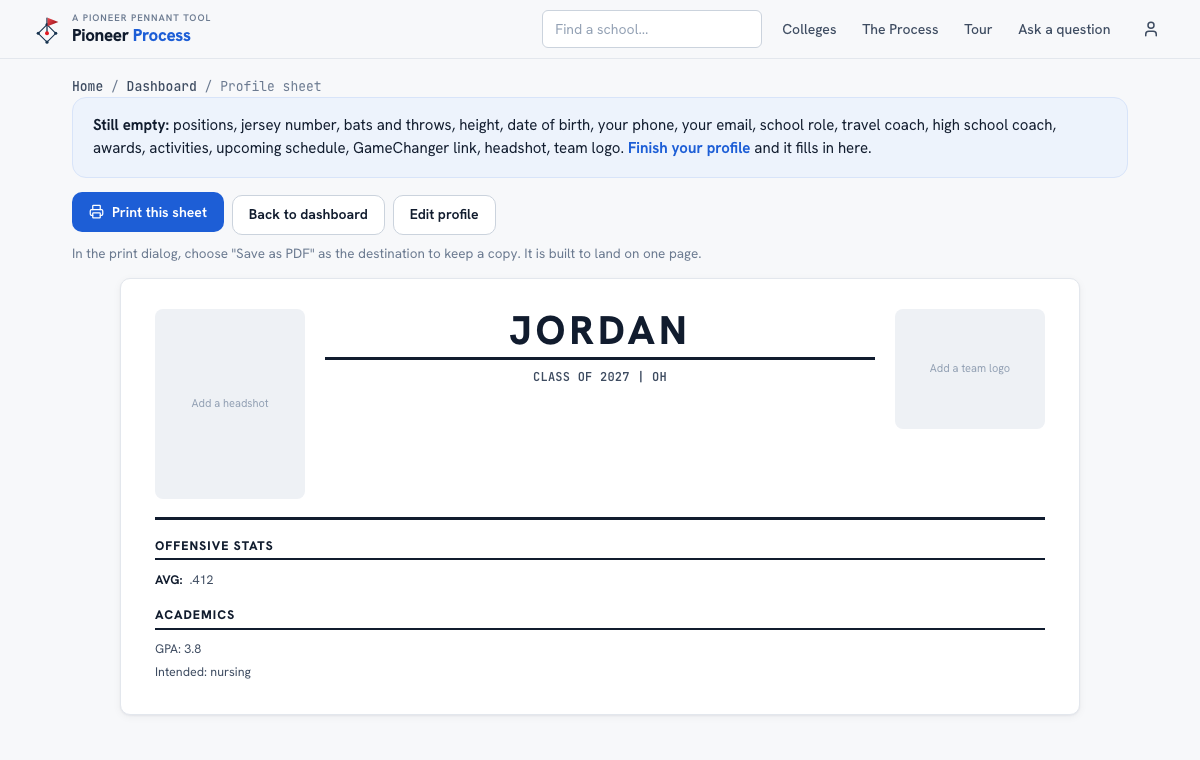
The one-page sheet coaches expect at a camp: headshot, measurables, stats, academics, coaches, schedule, socials, and a code that opens her GameChanger.
Steps
- Open Account, then Profile sheet. The page shows exactly what will print and lists anything still empty at the top.
- Add the two images on the Athlete page's Photos tab: a clear headshot and the team logo (travel or high school).
- Keep the Upcoming schedule current on the Athlete page; it prints in its own column and tells a coach where to go watch.
- Press Print this sheet. In the print dialog choose Save as PDF to keep a copy. It is built to land on one page.
- Bring printed copies to camps and attach the PDF to emails that ask a coach to come watch.
What good looks like
One page, one headshot, real numbers, the coaches a recruiter can call, three upcoming dates, and a code that opens her games on a phone.
Mistakes we see
- Printing with the schedule empty. That column is the one that tells a coach what to do next.
- Listing a coach who is not expecting the call.
- Putting recruiting intel on it. The sheet is written to be handed to coaches; the log is private and never prints.
Related
Upcoming schedule and photos Your athlete's profile Draft an email to a coach
Still stuck? Support reaches a person, and every guide lives at Help.