
Your athlete
The fit report
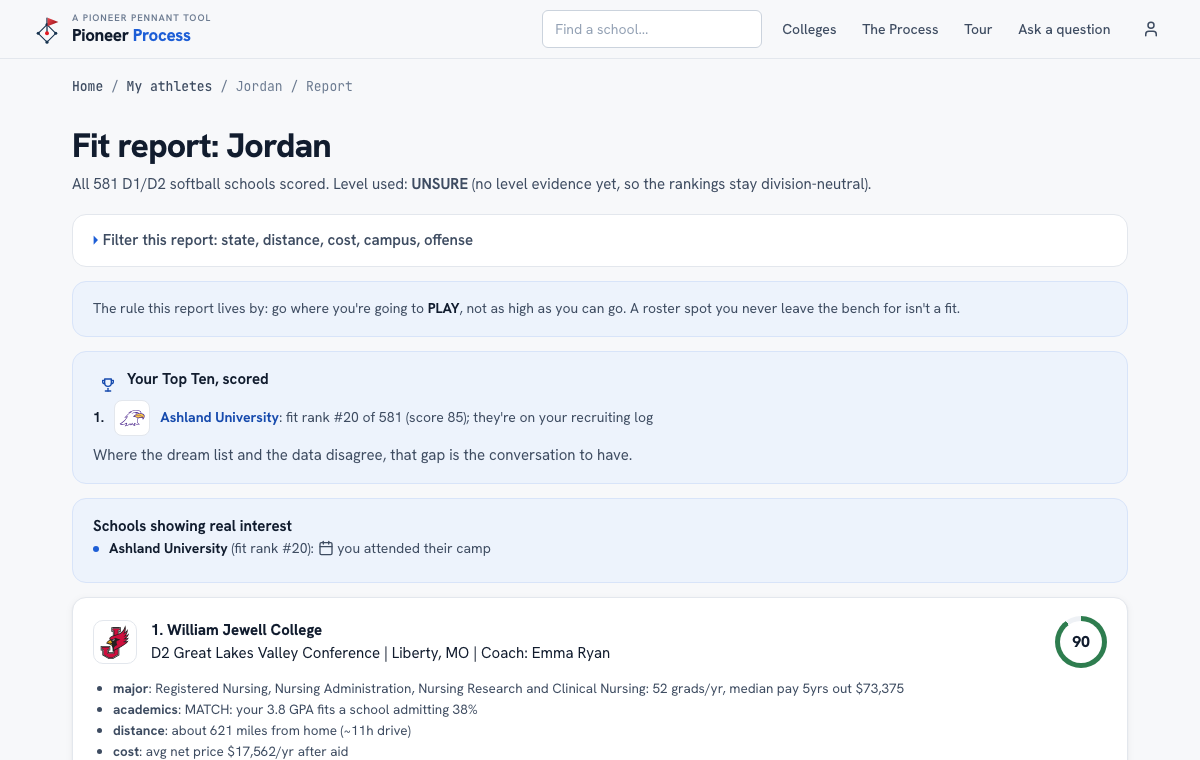
Every D1 and D2 program scored against her profile, with the reason spelled out line by line.
Steps
- Open Account, then Fit report. The first line says how many schools were scored and what level was used; UNSURE means there is no evidence yet, so rankings stay division-neutral.
- Read the Top Ten block first: each of her schools with its rank and score, and Schools showing real interest, built from the recruiting log.
- Each ranked school shows the why lines: major strength, academic fit (a REACH label means the admit rate is under 15 percent), distance, cost after aid, outcomes, and size and campus matches.
- Filter the report by state, distance, cost, campus, or D1 offense without changing the scores: ranks stay honest, the list just gets shorter.
- A high score is not an offer. It is a reason to email that coach this week.
What good looks like
The dream list and the data mostly agree, three or four schools she had never considered sit in the top 25 with a plain reason each, and the family has a list of coaches to write to.
Mistakes we see
- Reading a 92 as a commitment from anyone. Nobody at the school has seen this report.
- Filtering to one state and wondering why the list is short. The filter does not change scores; it hides schools.
- Ignoring the level line. Update the evidence question in the profile as coaches respond and the report changes.
Related
The Top Ten Your athlete's profile Draft an email to a coach The recruiting log
Still stuck? Support reaches a person, and every guide lives at Help.