
Reaching coaches
The recruiting log
Every camp, email, call, visit, piece of feedback, and offer, school by school, so traction is a record and not a feeling.
Steps
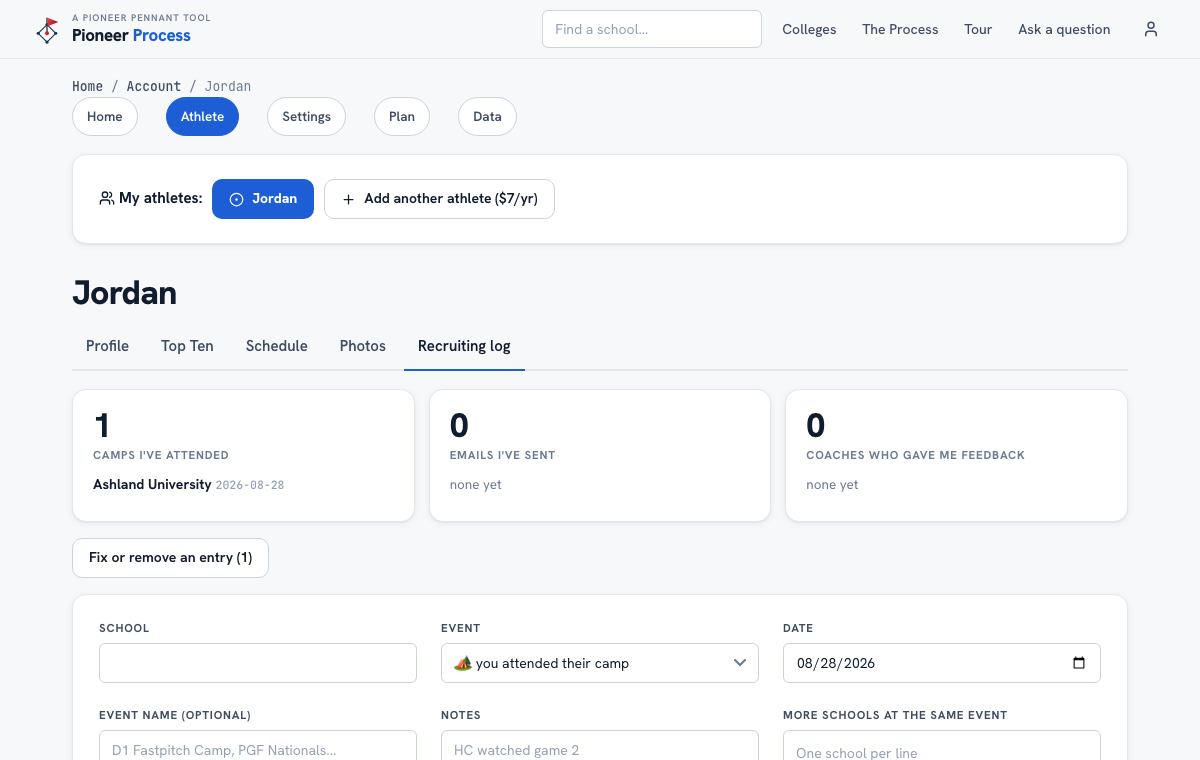
- Open Account, then Athlete, then the Recruiting log tab, or use Log activity on any school's page.
- Pick the school, the event type (camp, email sent, call or text with a coach, coach gave feedback, campus visit, offer), the date, and a note that a future you will understand: "HC watched game 2" beats "good weekend".
- One camp, five coaching staffs: list the other schools in More schools at the same event, one per line, and every one gets the entry.
- The dashboard above the form sums it up: camps attended, emails sent, coaches who watched, replies, offers. The fit report reads the same log for Schools showing real interest.
- Made a mistake? Fix or remove an entry is under the dashboard. An accidental offer is worth ten points on the report, so fix it.
What good looks like
A log where every school she has emailed shows the date, and every reply, silence, camp, and visit is written down, so the next email opens with a real reference instead of a reintroduction.
Mistakes we see
- Logging only the good news. Silence after an email is an answer, and it belongs in the log.
- Vague notes. Specifics are what you follow up on.
- Forgetting the other schools at a camp. The coach who watched from the next field counts.
Related
Draft an email to a coach The fit report Coaching changes
Still stuck? Support reaches a person, and every guide lives at Help.