
Start here
Getting started
The first hour: an account, one athlete, and the five things that make everything else work.
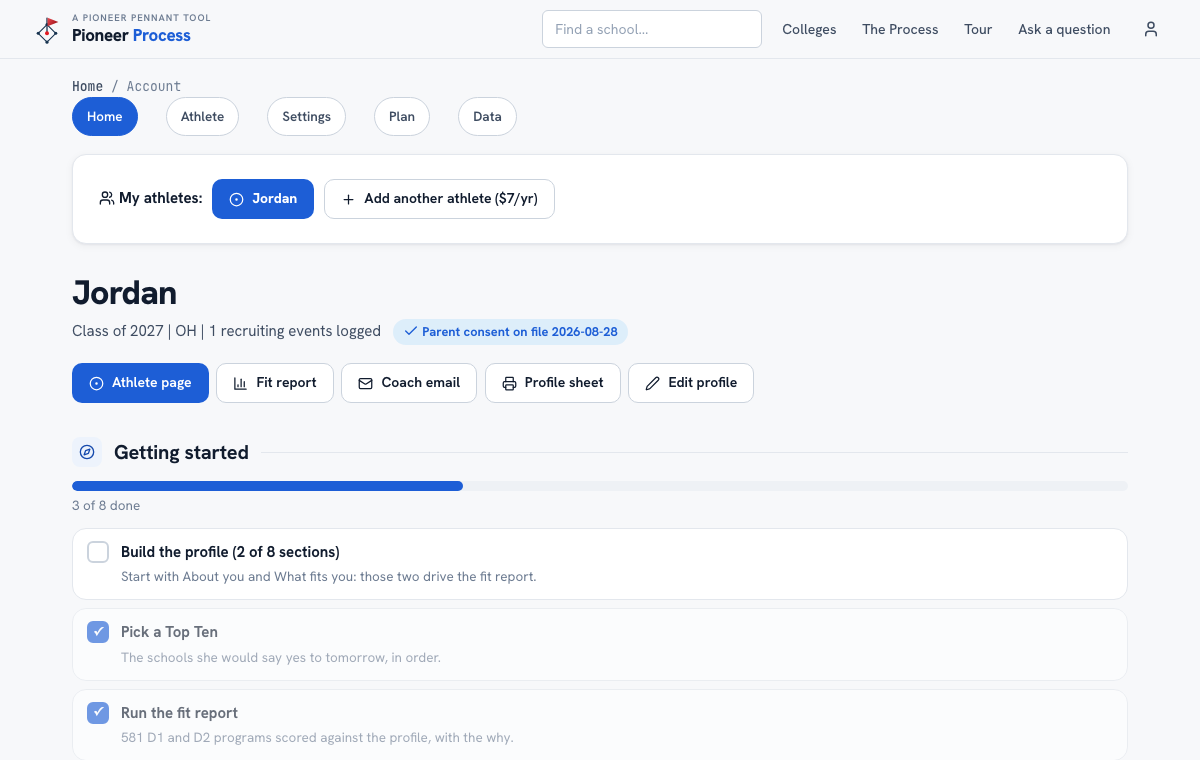
Steps
- Create the account from the Sign up page. A parent or guardian sets it up with a player under 18 and gives consent on the same form; the athlete's first name goes on the account.
- You land on Account Home. The Getting started list is the plan for the first hour: every line is a real, checkable step, and each one links to the page that finishes it.
- Open Edit profile and fill in About you first (state, class year, GPA, the majors she is considering). That one section is enough for a first fit report.
- Pick a Top Ten on the Athlete page: the schools she would say yes to tomorrow, in order.
- Run the Fit report, then log the first recruiting event (a camp, an email, a coach who watched).
- On a paid plan, the trial's end date and the charge are on the Plan page. Cancel there in one click if it is not for you; nothing is charged.
What good looks like
After an hour the meter reads four or five of eight, the fit report has a Top Ten scored at the top, and the profile sheet prints with a name, a class year, and real academics on it.
Mistakes we see
- Filling in every section before looking at anything. About you plus What fits you drive the report; the rest can wait for a rainy day.
- Setting the account up in the athlete's name and email when a parent will be the one using it. The login can be changed later in Settings, but it is easier to start right.
Related
Your athlete's profile The Top Ten The fit report Your plan, the trial, and cancelling
Still stuck? Support reaches a person, and every guide lives at Help.