
Finding schools
The school finder
Search every NCAA softball program at once, with the filters that matter for a student, not just a player.
Steps
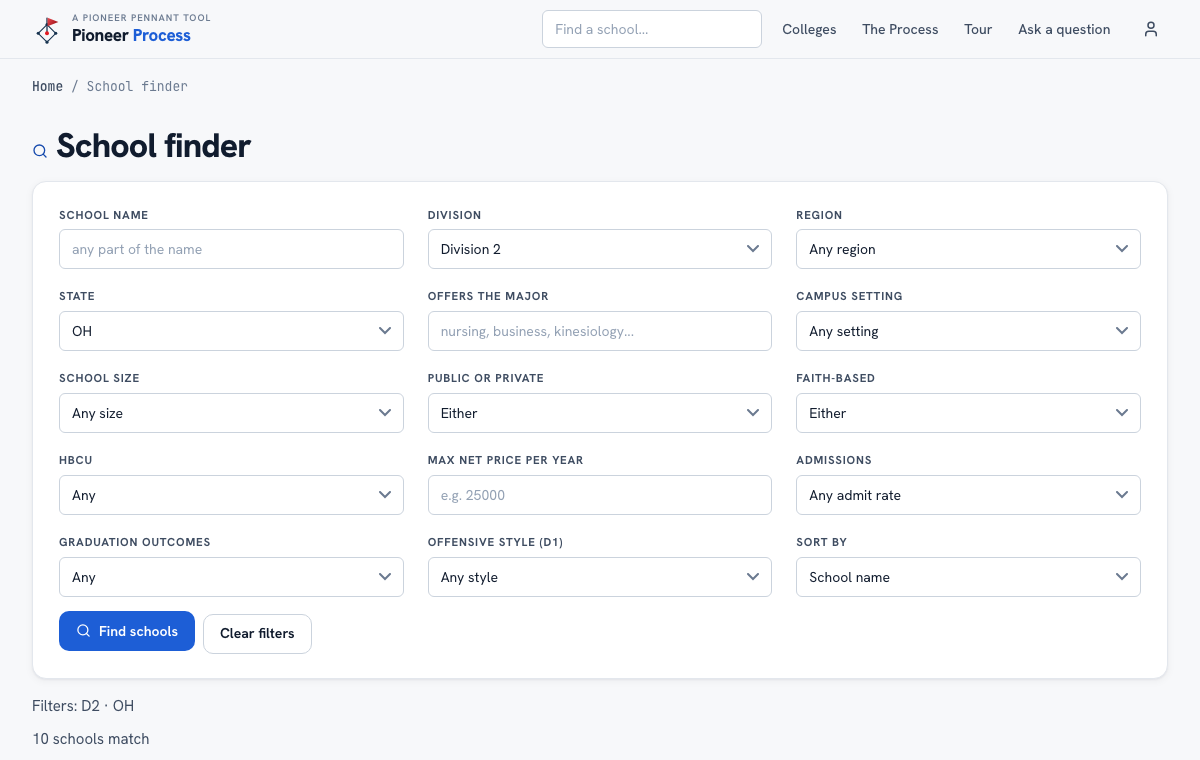
- Open Colleges, then School finder, or use the search box in the header for a school by name.
- Set Division and Region or State first: that alone takes 978 programs down to a list you can read.
- Add the major she wants (type a few letters; nursing, business, engineering all work). Only schools that actually graduate students in it stay on the list.
- Narrow by campus setting, school size, public or private, faith-based, HBCU, a maximum net price per year, admissions, and graduation outcomes. Leave anything you do not care about on Any.
- For D1, Offensive style filters by how the lineup actually scores: power, speed, small ball, patience.
- Sort by name, cost, size, or outcomes, then open any card for the full school page.
What good looks like
A list of 15 to 40 schools she has mostly never heard of, every one of them offering her major at a price the family can read, is the finder doing its job. The 20 famous names were never the whole market.
Mistakes we see
- Starting with the division she hopes for instead of the major and the cost. Level is a coach's call; the student side is the family's.
- Treating Max net price as sticker price. It is what the average student actually pays after aid, which is the number that matters.
- Filtering so tightly nothing survives. Widen one filter at a time.
Related
A school's page Find the right degree The fit report
Still stuck? Support reaches a person, and every guide lives at Help.