
Finding schools
A school's page
Everything Pioneer Pennant Process knows about one program, and the four things you can do from it.
Steps
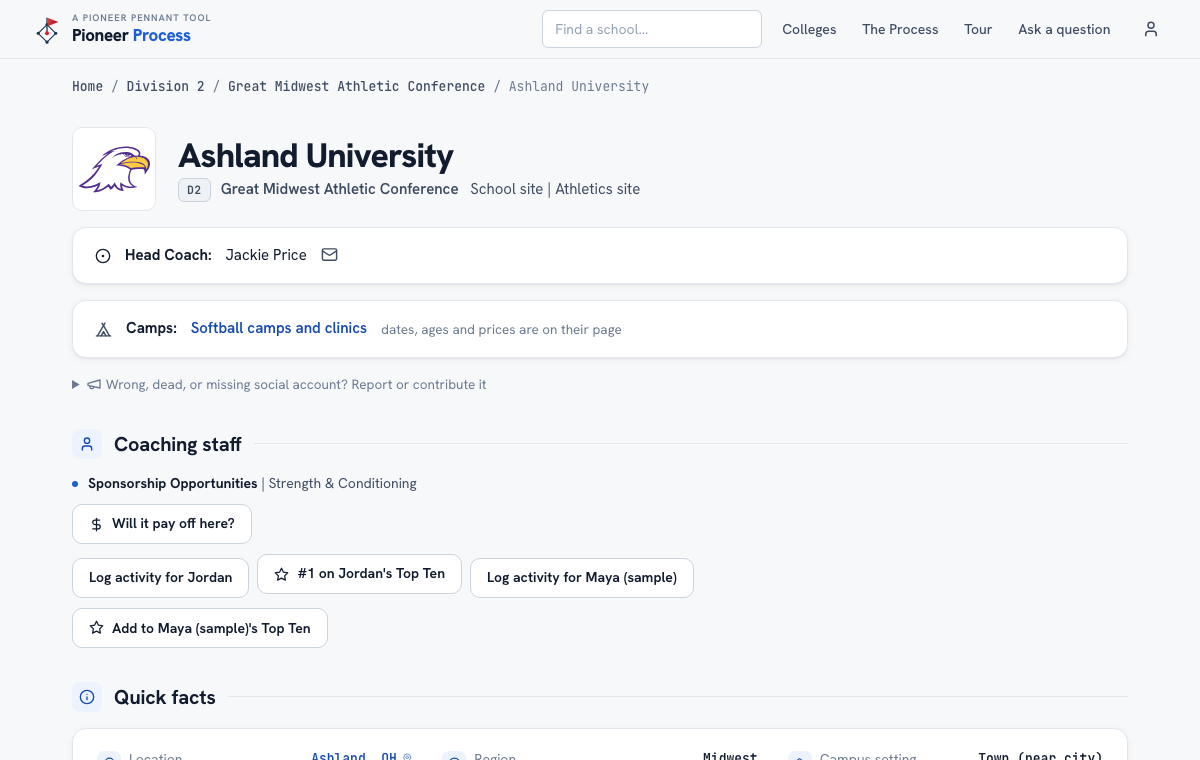
- The top line shows division, conference, and links to the school's own site and athletics site. The head coach and the program's camps page are right under it.
- Coaching staff lists the full staff with the contacts each school publishes. A coach with no email on file means the school does not publish one; that is not something we guess.
- The softball program section shows the program's social accounts, the roster by class year, and who leaves before each class arrives, which is the openings math for her position.
- Quick facts and Majors carry the student side: setting, size, admissions, cost after aid, graduation and retention, and every bachelor's program by how many students actually finish it.
- Use the buttons: Add to Top Ten, Log activity (a camp, an email, a call), and Will it pay off here, which opens the calculator with this school filled in.
- See a wrong or dead social account? Report it or contribute the right one from the link near the top; a person reviews every suggestion.
What good looks like
You leave the page knowing the coach's name, whether her position opens up the year she arrives, what the degree costs and pays, and with the school on the Top Ten or the log if it earned it.
Mistakes we see
- Emailing a coach from the page without checking the roster outlook. Three returning starters at her position is a conversation to have first, not after.
- Reading the roster count as a promise. Counts are lower bounds; ask the coach before reading much into them.
Related
The school finder The Top Ten The recruiting log Coaching changes
Still stuck? Support reaches a person, and every guide lives at Help.