
Teams
Join your team
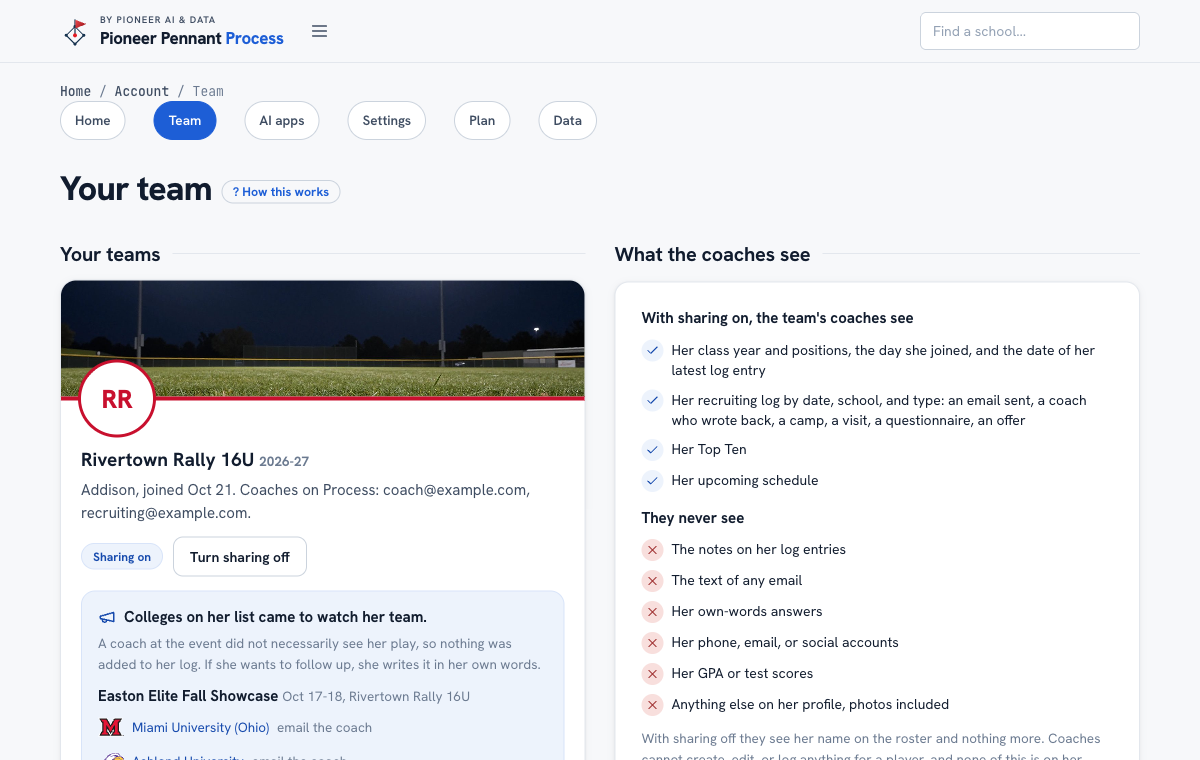
Put your athlete on her travel or club team's page, and choose what its coaches see.
Steps
- Get the code or the link from your team's coach. The link fills in the code for you.
- Sign in, or create the family's account, then open Team in your account, enter the code, and pick the athlete.
- Choose sharing. It starts off. A parent or guardian can check Share with the team's coaches when joining, or press Turn sharing on later; an athlete 18 or older can turn it on herself.
- With sharing on, the coaches see her class year and positions, her log by date, school, and type, her Top Ten, and her upcoming schedule. They never see her notes, emails, own-words answers, contact details, or grades.
- Give schedule entries a type and a college (a camp at a school, a campus visit) so the coaches see where she is headed. Neither prints on her profile sheet.
- When her team logs the colleges that came to a tournament, they go on her list of colleges to email on Home, for 60 days, the ones on her Top Ten or in her log first. Write the thank-you opens the drafter with the tournament filled in; each college checks off once she logs an email to it. Not for her takes one off, and She was not at this one clears a tournament she missed. Nothing goes in her log until she sends.
- To stop, press Turn sharing off. To leave, press Leave this team; her account and everything on it stay hers.
What good looks like
A parent joins with the code at the first practice and turns sharing on, and the team's recruiting coordinator can see which coaches have written back without asking every family in the group chat.
Mistakes we see
- Turning sharing on from the athlete's own login while she is under 18. It will not let her: a parent or guardian does it, from a parent login or the account the parent set up.
- Writing something in a log note for the coach to read. Notes stay with the family; tell the coach directly.
- Making a second account to join. Join from the account she already has, so her log and Top Ten come with her.
Related
Upcoming schedule and photos The recruiting log Your team page, for coaches
Still stuck? Support reaches a person, and every guide lives at Help.